दूसरे के बिजली बिल के SMS से परेशान? घर बैठे 2 मिनट में अपना नंबर हटाएं!Getting Someone Else's Electricity Bill SMS? Unlink Your Number in 2 Minutes
नमस्ते चौपाल वालों! सोचो, एक दिन फ़ोन बजा और मैसेज आया: किसी "रमेश चंद" के ₹45,000 के बकाया बिजली बिल का, और साथ में लाइन कटने की धमकी भी। आप सोच में पड़ गए: "मैंने तो किसी रमेश को नंबर दिया ही नहीं, ये कहाँ से आ गया?" मीटर भैया हँसकर कहता है: घबराओ मत, तुम्हारी लाइन नहीं कटेगी। चाय पियो, आज इसका इलाज भी बताते हैं। (सिर्फ़ जानकारी, कोई कानूनी सलाह नहीं।)
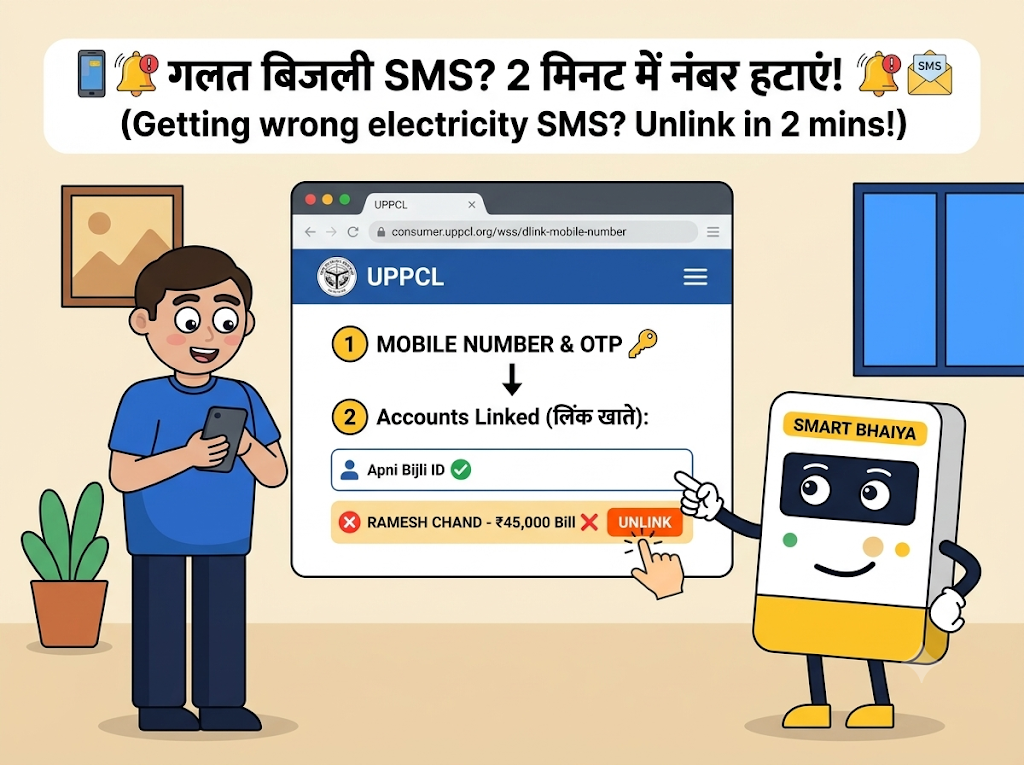
💡 क्विक समरी: अगर आपके फ़ोन पर किसी अनजान व्यक्ति के बिजली बिल, पेमेंट या लाइन कटने (Disconnection) के मैसेज आ रहे हैं, तो घबराएं नहीं। बिना बिजली ऑफिस जाए और बिना ₹1 खर्च किए आप घर बैठे अपना मोबाइल नंबर उस खाते से Unlink (हटा) सकते हैं।
1. पहले समझो: ये मैसेज आ क्यों रहे हैं?
आपका मोबाइल नंबर गलती से किसी और के बिजली खाते (Account ID) से लिंक हो गया है। इसके पीछे दो ही वजहें होती हैं:
- रीसाइकल्ड सिम (Recycled SIM): हो सकता है यह नंबर पहले किसी और के नाम था। उसने सिम बंद कर दिया और टेलीकॉम कंपनी ने वही नंबर आपको जारी कर दिया। तो पुराने मालिक के बिल के मैसेज अब आपको आ रहे हैं।
- टाइपिंग की गलती (One-Digit Mistake): किसी उपभोक्ता ने अपना नंबर रजिस्टर कराते समय एक अंक गलत लिख दिया, और वो आपका नंबर निकल गया!
2. बिजली ऑफिस जाना पड़ेगा क्या?
बिल्कुल नहीं! UPPCL ने इसके लिए ऑनलाइन सुविधा दी है: न कोई फॉर्म, न कोई फीस, और न ही ऑफिस के चक्कर।
3. 2 मिनट में नंबर Unlink करने का Step-by-Step तरीका
अपने फ़ोन या कंप्यूटर से ये स्टेप्स फॉलो करें:
- आधिकारिक पोर्टल खोलें: UPPCL की मोबाइल नंबर डी-लिंक सुविधा पर जाएं 👉 consumer.uppcl.org/wss/dlink-mobile-number
- मोबाइल नंबर डालें: बॉक्स में अपना वह मोबाइल नंबर दर्ज करें जिस पर गलत SMS आ रहे हैं (पेज पर दिया कैप्चा भी भरना होगा)।
- OTP से वेरिफाई करें: आपके फ़ोन पर एक OTP आएगा, उसे डालकर वेरिफाई करें। यह इसलिए सुरक्षित है कि बिना OTP के कोई दूसरा आपके नंबर की जानकारी नहीं देख सकता।
- लिंक हुए खातों की लिस्ट देखें: स्क्रीन पर आपके मोबाइल नंबर से जुड़े सभी बिजली खातों (Account IDs) की लिस्ट खुल जाएगी।
- अनजान खाते हटाएं (Unlink): लिस्ट में जो भी खाता आपका नहीं है, उसके सामने दिए गए Unlink / Remove बटन पर क्लिक कर दें। बस, हो गया काम!
और अगर नंबर पर कोई खाता जुड़ा ही नहीं है, तो पेज पर "No Account is linked to this mobile number" जैसा संदेश दिखेगा।
4. मीटर भैया की 3 ज़रूरी सावधानियां (Unlink करने से पहले चेक करें)
- पूरी लिस्ट ध्यान से देखें: पेज बंद करने से पहले नीचे तक पूरी लिस्ट चेक करें। कई बार पुराने किराए के घर, पुरानी दुकान या किसी रिश्तेदार का कनेक्शन भी आपके नंबर से जुड़ा रह जाता है।
- अपना खुद का खाता गलती से न हटाएं: अनजान खातों को हटाने के बाद यह ज़रूर कन्फर्म करें कि आपका अपना बिजली कनेक्शन आपके नंबर से जुड़ा रहे। वरना आपको खुद के बिल और ज़रूरी अलर्ट के SMS मिलना बंद हो जाएंगे।
- टेक्निकल दिक्कत आए तो 1912 मिलाएं: अगर किसी कारणवश पोर्टल पर OTP न आए या कोई खाता अनलिंक न हो, तो अपना कंज्यूमर नंबर (Account ID) साथ रखकर UPPCL हेल्पलाइन 1912 पर कॉल करें।
5. आधिकारिक स्रोत और उपयोगी लिंक
- UPPCL Mobile Number Unlink Portal: https://consumer.uppcl.org/wss/dlink-mobile-number
- UPPCL उपभोक्ता हेल्पलाइन: 1912 (24x7 उपलब्ध)
याद रखें: यह सिर्फ़ जानकारी है, कानूनी सलाह नहीं। पोर्टल का पेज, स्टेप्स और नियम बदल सकते हैं, इसलिए कोई भी खाता हटाने से पहले स्क्रीन पर दिख रही जानकारी ध्यान से पढ़ लें।
Hello Chaupal! Imagine your phone buzzes with a message about someone called "Ramesh Chand": a ₹45,000 pending electricity bill, plus a warning that the line will be cut. You think: "I never gave my number to any Ramesh, how did this reach me?" Meter Bhaiya grins: relax, your line is not getting cut. Have some tea, let us fix this too. (Information only, no legal advice.)
💡 Quick summary: If you keep getting electricity bill, payment or disconnection messages meant for a stranger, do not panic. Without visiting any electricity office and without spending even ₹1, you can unlink your mobile number from that account from home.
1. First, why are these messages coming?
Your mobile number has been linked to someone else's electricity account (Account ID) by mistake. There are only two usual reasons:
- Recycled SIM: this number may earlier have belonged to someone else. They closed the SIM, the telecom company issued the same number to you, and now the old owner's bill messages come to you.
- One-digit typing mistake: a consumer made one wrong digit while registering their own number, and it turned out to be yours!
2. Do I have to go to the electricity office?
Not at all! UPPCL provides an online facility: no form, no fee, no trips to the office.
3. Unlink your number in 2 minutes: step by step
Follow these steps from your phone or computer:
- Open the official portal: go to the UPPCL mobile number de-link page 👉 consumer.uppcl.org/wss/dlink-mobile-number
- Enter your mobile number: type the number on which the wrong SMS are arriving (the page also asks for a captcha).
- Verify with OTP: an OTP will come to your phone. Enter it to verify. This is safe because nobody else can see the details linked to your number without the OTP.
- See the list of linked accounts: the screen shows all electricity accounts (Account IDs) linked to your mobile number.
- Unlink the unknown accounts: for every account in the list that is not yours, click the Unlink / Remove button next to it. That is it!
And if no account is linked to the number at all, the page shows a message like "No Account is linked to this mobile number".
4. Meter Bhaiya's 3 important cautions (check before you unlink)
- Read the whole list carefully: scroll to the bottom before closing the page. Sometimes an old rented house, an old shop or a relative's connection stays linked to your number too.
- Do not remove your own account by mistake: after removing the unknown accounts, confirm that your own connection is still linked to your number. Otherwise you will stop getting SMS for your own bills and important alerts.
- If there is a technical problem, call 1912: if the OTP does not arrive on the portal or an account does not unlink, keep your consumer number (Account ID) handy and call the UPPCL helpline 1912.
5. Official sources and useful links
- UPPCL Mobile Number Unlink Portal: https://consumer.uppcl.org/wss/dlink-mobile-number
- UPPCL consumer helpline: 1912 (available 24x7)
Please note: this is information only, not legal advice. The portal page, steps and rules can change, so read what is on the screen carefully before you remove any account.
Sources
- UPPCL Mobile Number Unlink (De-link) portal:
- https://consumer.uppcl.org/wss/dlink-mobile-number
- UPPCL consumer helpline 1912 (24x7)
- Portal screens verified from the user's own phone screenshots (22 Nov 2026): the Delink mobile number form and the 'No Account is linked to this mobile number' message